You co-own that vehicle rather than a single individual. Or you simply want to add your spouse as another owner just in case. Or you want to add a friend, family member or relative as a secondary motor vehicle owner in that Logbook. Regardless of what your intentions might be for example a hire purchase, loan agreement, etc reason, the Beneficiary owner feature in the Uganda motor logbooks is now available as previous suggested by the Ministry of Works and Transport (MoWT). This article will take you through the step by step o n how to add beneficiary (2nd) owner on the URA web portal.
Adding a beneficiary owner in the motor vehicle logbook is something that may be a co-owned asset. Yes, this can help avoid unnecessary wrangles that arise when 2 people own a vehicle but only a single one is registered as the rightful owner, or in situations when one borrows money and the vehicle is the collateral. With the beneficiary owner in place, you are able to add that other owner where by all transactions concerning can sometimes be completed once the second owner is notified and they agree. Besides, the is an option of removing such owners.
Adding Beneficiary Owner On Your TIN
The process is very simple and easy for as long as you follow the simple instructions below. Also note that the beneficiary owner must be registered with an active Tax Identification Number (TIN).
- Visit https://ura.go.ug/
- Click login under the three dotted lines.
- Select Portal and enter the account credentials (TIN and Password)
- Click on Motor Vehicle from the left panel
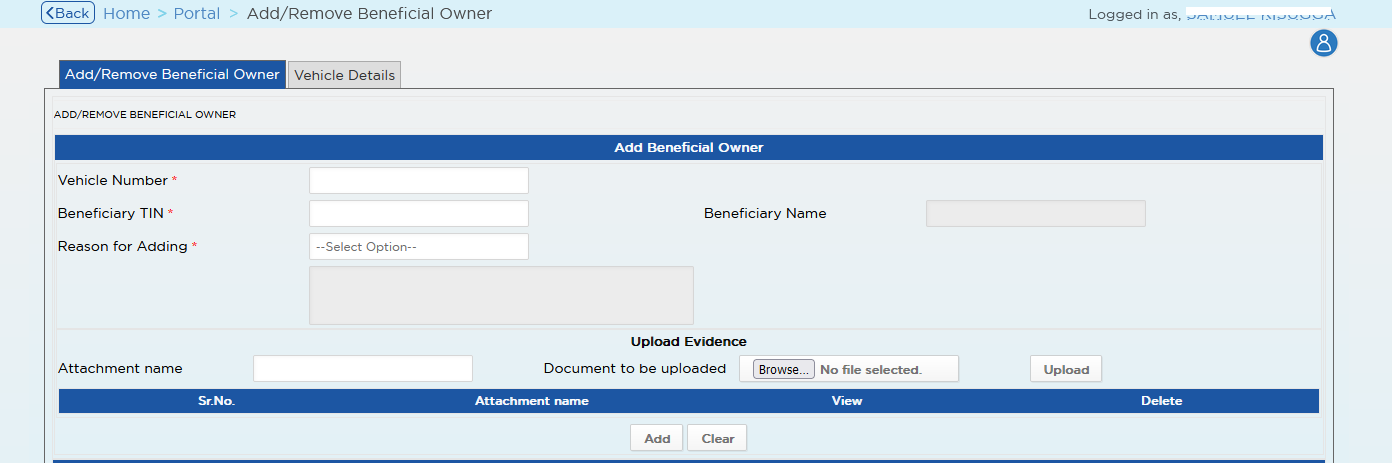
- Click Add beneficiary owner
- Enter details including TIN, vehicle number and reason
- Click add and you are done.
Remove Beneficiary owner

- Visit https://ura.go.ug/
- Click login under the three dotted lines.
- Select Portal and enter the account credentials (TIN and Password)
- Click on Motor Vehicle from the left panel
- Click Add beneficiary owner
- Follow the remove option by vehicle or tin
Remember, this is a new service which is subject to approval by the Ministry of Works and Transport. Should you want to know additional details, please refer to the Chief Licensing officer Ministry of Works.
Discover more from Thekonsulthub.com
Subscribe to get the latest posts sent to your email.